
TomTom - Maps & Traffic
TomTom International BVMaps & Navigation
4.3633.00 Reviews
- Version
- 17.46.2-production
- Installs
- 10.00M
- Age Rating
- Everyone
Screenshots
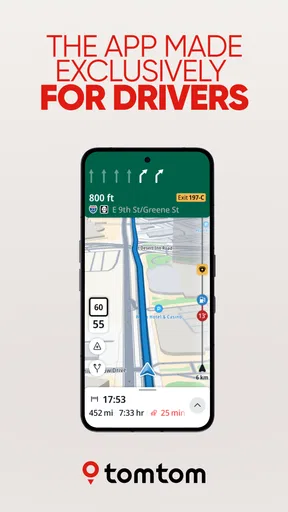
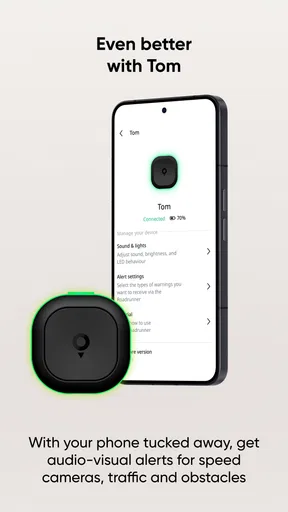
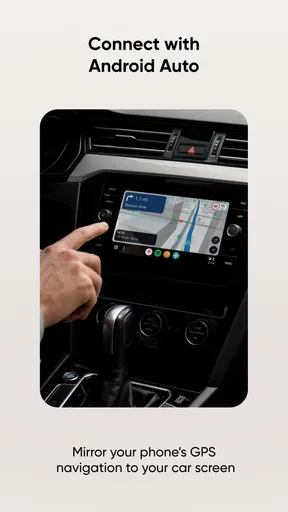
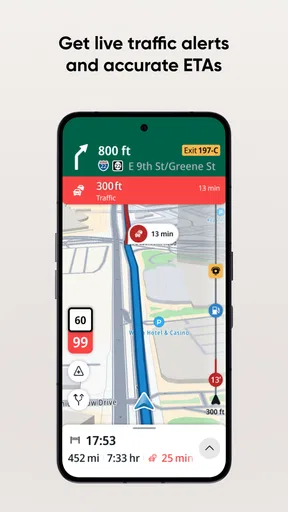
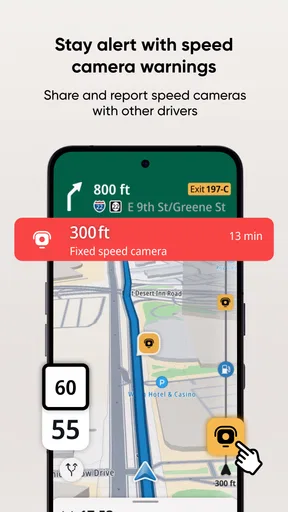
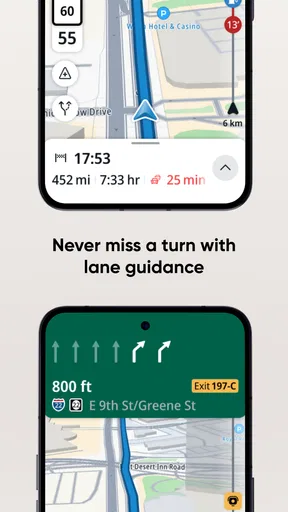
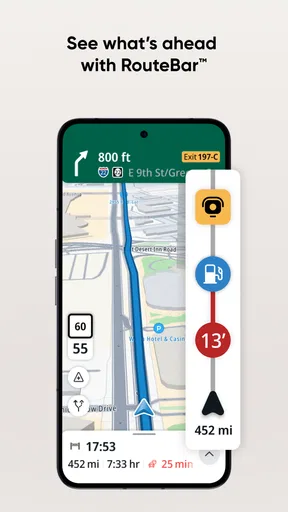
Our Review of TomTom - Maps & Traffic
 Analysis by Appyee
I approached TomTom - Maps & Traffic as a practical navigation tool rather than just another map on my phone. It comes from TomTom International BV, a name closely associated with route guidance, and the app now carries the TomTom identity after formerly being known as AmiGO. That change matters mainly because it tells me what to expect: a focused driving companion, not a social travel platform or a general-purpose city guide.
At its best, the app helps me make everyday journeys with less guesswork. I can use it for commuting, unfamiliar roads, longer drives, and those awkward trips where a small delay can change the whole route. It is free, rated for Everyone, and available for devices running Android 9 or later. Those details make it easy to try, although the real question is whether its approach to traffic, guidance, and user control fits the way I drive.
The app has built a substantial audience, with more than ten million installs and an average rating of 4.3 from roughly two hundred five thousand ratings. I see that as useful context rather than proof that it will suit everyone. Navigation is personal: one driver wants the fastest possible route, another wants a calm interface, while someone else cares most about offline preparation or avoiding unnecessary data sharing. My experience is that this app is strongest when I treat it as a clear, driving-first assistant and pay attention to its choices before setting off.
How TomTom earns trust on an ordinary drive
On an ordinary drive, I trust navigation more when I can check its advice against what I know: the road type, the destination entrance, and the signs in front of me. This section looks at how that balance works in practice, and why a little preparation can make traffic guidance feel useful rather than intrusive. It also sets up the habits that help me get more from the app without treating every suggested turn as a command.
A navigation app with a deliberately narrow purpose
The first thing I noticed is the focused nature of the experience. TomTom - Maps & Traffic is built around getting from one place to another, with traffic information at the center of the decision-making. That focus is valuable because the screen does not need to compete with news feeds, messages, restaurant promotions, or a large collection of unrelated travel tools. When I am already concentrating on the road, a navigation app that stays in its lane feels more trustworthy than one that constantly tries to become something else.
That does not mean the app is automatically better than every familiar alternative. Google Maps remains more useful when I want business information, public transport context, reviews, or a broad view of what is around a destination. Waze can feel more community-driven for drivers who enjoy incident reports and a lively stream of road updates. I would choose TomTom when the main job is route guidance and traffic awareness, especially if I prefer a more dedicated navigation identity.
The current version is 17.46.2-production, which is a helpful sign for anyone checking compatibility or trying to understand what is installed. The app was released on December 9, 2014, so it is not a new experiment. At the same time, a long history does not remove the need to check how the current build behaves on a particular phone. Navigation depends heavily on location access, connectivity, battery condition, and the quality of map information in the area where I am driving.
What I check before giving any navigation app permission
My trust test begins before I plan a route. I open the app’s permission and privacy controls on the phone and look at what access is requested, when it is used, and whether the operating system lets me limit it. I do not assume that a navigation app needs every possible permission simply because it needs my location. I check the Android permission panel directly, because that is where the practical choices are visible to me.
Location access deserves the most attention. If I want turn-by-turn guidance while moving, location is obviously central to the experience. I still prefer granting the narrowest option that lets the app work properly, and I revisit that choice if I stop using navigation regularly. I also watch for the difference between access while the app is open and access that continues in the background. The operating system’s wording is more useful here than a vague assumption about what the app might do.
I use the same careful approach with notifications and any other permission the phone presents. Traffic warnings can be useful, but I do not want every alert enabled by default if it distracts me or appears when I am not travelling. The practical lesson is simple: install the app, review each request in context, and keep only the controls that support how I actually use it. That process gives me more confidence than blindly accepting everything during setup.
Account choices and the value of keeping the setup simple
One question many drivers have is whether they must create an account before they can navigate. I do not treat account creation as a harmless formality. If the app offers a usable route-planning experience without an account, I prefer starting there and only signing in if a specific feature makes it worthwhile. If an account is requested, I read the screen carefully and check what is optional, what is required, and whether the app gives me a way to continue without adding unnecessary personal details.
I also look for account controls after setup rather than assuming the first choice is permanent. A good routine is to open the app’s settings, identify profile or account options, review notification choices, and check the phone’s permission manager separately. These are different layers of control. Removing location permission from Android, for example, is not the same as changing a setting inside the app, and both deserve attention.
I would not use a navigation app while driving to investigate privacy settings. I make these decisions at home, then leave the phone alone once the journey begins. This is one of the less obvious advantages of a focused tool: when I prepare the route and permissions in advance, I can reduce the temptation to interact with the screen on the road.
How I use it on a realistic commute
Imagine a weekday journey to work that normally takes a familiar set of roads. I start the route before leaving, confirm the destination, and check whether the suggested path makes sense rather than following it automatically. If traffic changes the recommendation, I want to understand the trade-off: is the alternative genuinely useful, or does it send me through complicated local streets to save a small amount of time?
That habit is important because the fastest displayed route is not always the best real-world route. A narrow residential shortcut may be stressful, poorly suited to a larger vehicle, or undesirable during school arrival times. I treat the app’s suggestion as advice, not an instruction. If I know a road well, I may stay on it even when the application proposes a different turn. Navigation should support my judgement, not replace it.
For an unfamiliar hospital, office, or airport, I prepare more carefully. I check the final approach because reaching the correct street does not always mean reaching the right entrance or parking area. I also allow extra time when the route includes complicated interchanges. A map can guide me through the road network, but it cannot remove every uncertainty at the destination itself.
Traffic information is useful, but it changes the privacy equation
Traffic guidance is the feature that makes this more than a static map for me, but it is also the point where data sensitivity becomes most relevant. A traffic-aware route needs some understanding of where I am and how I am moving. I therefore use live guidance when the benefit is meaningful, such as during a congested commute or a long unfamiliar drive, and I avoid leaving navigation active when I have already arrived.
This is not about assuming bad intentions or making claims about invisible data practices. It is about recognizing the connection between convenience and access. The more precisely an app helps with a current journey, the more carefully I should review the location choices that enable that help. I look for clear explanations in the app and in the operating system, and I prefer settings that let me make an informed decision instead of presenting access as an all-or-nothing mystery.
There is also a practical battery trade-off. Active navigation, a bright display, mobile data, and location services can all make a phone work harder. I keep the device charged for longer trips and avoid running the app unnecessarily after parking. This is not a flaw unique to TomTom, but it is easy to forget when a navigation app feels effortless during a short drive.
Small workflows that make the app more dependable
My first useful workflow is to prepare before the car moves. I enter the destination while stationary, verify the route, adjust the phone mount, and wait for guidance to settle. This reduces last-second tapping and makes it easier to notice a surprising route before I am committed to it. It also gives me a moment to check whether the destination itself is correct, which prevents many navigation mistakes that have nothing to do with map accuracy.
My second workflow is to keep a human backup for important journeys. For a medical appointment, a remote meeting, or a trip with a strict arrival time, I note the destination address and a recognizable landmark separately. If the phone loses signal, the battery runs low, or the final road is confusing, I am not completely dependent on one screen. This is especially sensible for drivers who travel through areas with weak connectivity.
The third is to treat rerouting as a prompt for a decision, not an order. When the app suggests a change, I consider road type, weather, familiarity, and the likely difficulty of the alternative. On a quiet weekend drive I may accept a longer scenic route; during heavy rain I may prefer a familiar main road even if it is slower. The app can calculate a route, but only I know which compromises feel reasonable.
A fourth useful habit is to review settings after an update. The installed version can change the layout or the location of controls, so I do not assume that a permission, alert, or account option remains exactly where I remember it. I check before an important trip rather than discovering a new prompt at the worst possible moment. This is a modest step, but it improves both usability and confidence.
Where the experience can create friction
The app is not the right choice for every kind of navigation. If I am exploring a city on foot, searching for a café, comparing business reviews, or combining driving with public transport, a broader mapping platform may save me from switching between apps. TomTom’s driving focus is an advantage for one job and a limitation for another.
I also would not rely on any traffic service as the sole authority during unusual conditions. Road closures, temporary diversions, local events, severe weather, and newly changed road layouts can make a calculated route less convincing than local knowledge or official signs. I follow road signs and legal instructions first. If the screen conflicts with what I can clearly see on the road, the screen loses.
Another possible source of frustration is the balance between helpful alerts and distraction. Drivers have different tolerance levels, and an alert that helps one person may annoy another. I prefer to configure notifications while parked and keep the visual experience calm. If I find myself repeatedly reaching for the phone to dismiss prompts, I consider that a sign to simplify the setup rather than accept the distraction as normal.
Users who are especially sensitive about location sharing should spend time with the phone’s controls before relying on live traffic. That does not make the app unusable, but it may make a different navigation method more comfortable, such as planning a route in advance and limiting active use. The best choice depends on whether live traffic benefits outweigh the personal control a driver is willing to give up.
Who should install it, and who should look elsewhere?
I think this app is a good fit for drivers who want a dedicated Maps & Navigation tool, prefer a clean driving purpose, and regularly need traffic-aware routing. It is also worth considering if the former AmiGO name is familiar and you want to continue with the product under the TomTom brand. The free price makes testing straightforward, and the Everyone age rating keeps it broadly accessible for households sharing compatible devices.
I would point occasional city explorers toward a more comprehensive map if their main need is finding shops, reading place information, or planning a mixed-mode journey. I would also be cautious about recommending it to someone who wants to avoid location-based services altogether. A traffic-focused navigation experience and strict avoidance of location access are naturally difficult goals to combine.
Before installing, I would check that the phone runs Android 9 or later, that there is enough battery for the journey, and that the driver has a safe way to mount and operate the device. I would not choose an app solely because it has a high install count or a strong average rating. Those figures provide reassurance that many people use it, but they do not answer the personal questions about permissions, route preferences, destination habits, or tolerance for alerts.
My cautious verdict after weighing convenience against control
TomTom - Maps & Traffic makes the most sense to me as a focused driving companion. Its strongest quality is not that it tries to do everything; it is that it keeps the central task visible: helping me make route decisions in changing traffic. The TomTom International BV connection and the app’s long presence on mobile give it a credible foundation, while the current version shows that it remains an actively maintained product rather than an abandoned download.
My recommendation comes with a condition: set it up deliberately. Review location access, notifications, and account choices before driving. Use live traffic when it solves a real problem, stop navigation when the journey ends, and keep independent awareness of signs and road conditions. These habits let me benefit from the app without handing over more control than I intend to.
For a driver who wants a free, dedicated navigation option and is comfortable making thoughtful permission choices, I would recommend giving it a try. For someone seeking a full local-discovery guide, a walking planner, or a completely location-free experience, another tool may be a better match. The app earns my cautious recommendation because its usefulness is real, but the best experience comes from an informed driver who stays in control.
Verdict
Strengths of TomTom - Maps & Traffic
- Offline maps help with navigation when mobile coverage is unavailable.
- Clear turn-by-turn directions are easy to follow while driving.
- Live traffic updates can help identify delays and faster alternative routes.
- Speed camera alerts encourage safer, more attentive driving.
- Maps and routes are regularly updated with new road information.
Limitations of TomTom - Maps & Traffic
- Many advanced navigation features require a paid subscription.
- Offline map downloads can use considerable storage space.
- Traffic information depends on an active internet connection.
- Battery consumption may increase during long navigation sessions.
- Some route suggestions may be less accurate in remote areas.
Other Releases by TomTom International BV
View All
TomTom GO Expert: Truck GPS
Maps & Navigation3.6
Similar Picks in This Category
View All
Uber - Request a ride
Uber Technologies, Inc.4.7


inDrive. Rides with fair fares
® SUOL INNOVATIONS LTD4.8

Yandex Go: Taxi Food Delivery
Mikromobilnost LLC Belgrade4.8

Bolt: Request a Ride
Bolt Technology4.8

Rapido: Bike-Taxi, Auto & Cabs
Rapido Bike Taxi4.8
Frequently Asked Questions
What is TomTom – Maps & Traffic used for?
TomTom – Maps & Traffic is a navigation app designed to help drivers plan routes, follow turn-by-turn directions, and monitor traffic conditions. It can provide estimated arrival times, route alternatives, speed information, and alerts that may help you avoid delays. The app is most useful for everyday commuting, road trips, and driving in unfamiliar areas, although available features may depend on your region and subscription plan.
Does TomTom – Maps & Traffic work without an internet connection?
The app may support offline navigation when users download the appropriate maps in advance, which is useful when traveling through areas with weak mobile coverage or when trying to reduce data usage. However, live traffic updates, changing road conditions, online search, and some other connected services generally require an internet connection. Before traveling, check that the required maps are downloaded and updated.
Is TomTom – Maps & Traffic free to download and use?
TomTom – Maps & Traffic can generally be downloaded at no initial cost, but access to certain navigation tools or premium services may require a subscription, in-app purchase, or account. The exact pricing and included features can vary by country, operating system, promotional offer, and app version. It is worth reviewing the purchase screen carefully before starting a trial or recurring plan.
What information does TomTom – Maps & Traffic need to provide navigation?
For accurate navigation, the app normally needs permission to use your device’s location while driving. Depending on the features you use, it may also require mobile data, notifications, Bluetooth, or background location access. You can manage these permissions through Android or iOS settings, but limiting location or notification access may reduce the accuracy of directions, traffic updates, alerts, or automatic rerouting.
Can TomTom – Maps & Traffic be relied on as the only source of driving directions?
TomTom – Maps & Traffic can be a helpful navigation assistant, but it should not replace safe driving practices or road signs. Traffic data, map information, temporary closures, speed limits, and suggested routes may occasionally be inaccurate or delayed. Keep your attention on the road, follow local regulations, and verify unusual instructions when necessary. Never adjust the phone while driving unless it is safely mounted and permitted by law.
